Today, we're launching Aleph 2.0 — an upgrade to Runway's flagship video editing model — alongside Edit Studio, a new product experience built to make the most of the new capabilities. Together, Aleph 2.0 and Edit Studio close the gap between the video you already have and the one you actually need.
What's new
Aleph 2.0 introduces several new and updated model capabilities, all unlocked in Runway’s Edit Studio:
Work with up to 30s of 1080p video
You can now edit clips up to 30 seconds long at 1080p. Long enough for ads, social posts and short-form content.
Localized edits with precise input video preservation
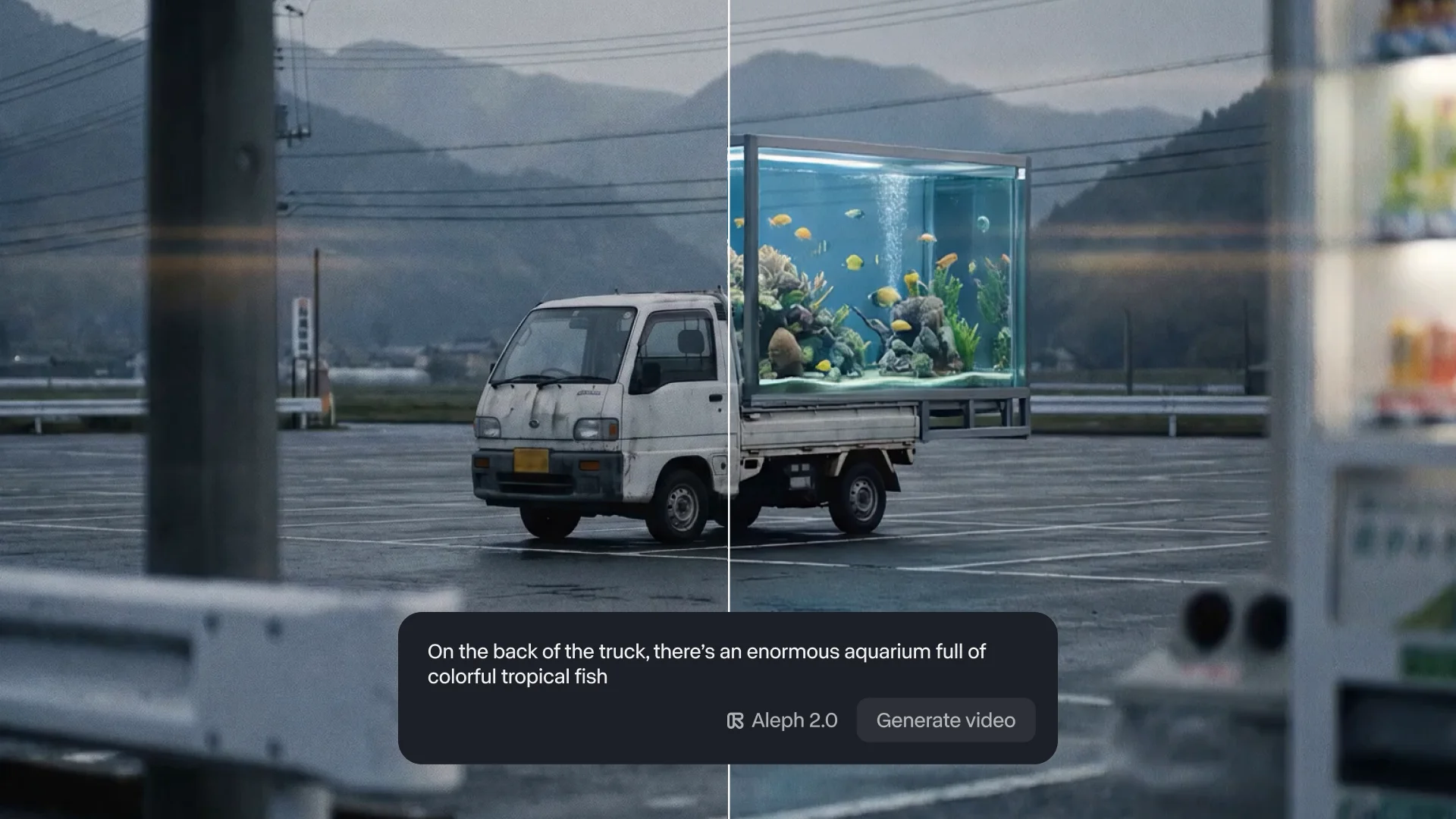
Most AI video editing models change more than what you asked for — new cuts get added in, objects are modified, the scene action isn’t the same. Aleph 2.0 makes targeted edits, changing only what you want to change and keeping everything else just as it was.
When the rest of your video needs to match the original, that fidelity separates a usable edit from one that's drifted too far from the source.
Image-level control over video edits
Aleph 2.0 brings image-editing precision to video. Give Aleph 2.0 a frame with the edit you want, and it edits your video to match. You'll know what your change will look like upfront, resulting in fewer wasted generations and faster iteration.
Other AI video models leave the final look up to the model — you describe what you want, the model interprets it, and you don't know what you'll get until the full generation comes back. With Aleph 2.0, your edited frame defines what the change should look like, and the model carries it through to the right parts of your video.
Edit across multiple shots at once
In videos with multiple cuts or scene changes, Aleph 2.0 will apply your edit across relevant shots. You no longer need to edit your videos shot-by-shot.
What this makes possible
Runway's new Edit Studio app is built around Aleph 2.0's capabilities. Designed for marketing teams making campaign variations, filmmakers refining footage in post, small business owners refreshing existing videos as offerings change and more, Edit Studio allows any Runway user to get more out of their existing videos.
For these teams, the gap between the video they have and the video they need is usually a question of cost and time. Most teams end up shipping less video than they know they should, or settling for cuts that aren't quite right. Edit Studio closes that gap.
In Edit Studio, you can preview your change as an image so you can shape the look before you commit to generating your final video. Try different versions, refine your approach and cut down on the number of iterations needed.
- Swap a product for a new variant or colorway.
- Change the background to a different setting or location.
- Make the seasonal version of an existing campaign.
- Change the lighting – soften harsh lighting, change the time of day or set the mood you wanted.
- Remove distractions – a logo on the wall, an item in frame, a stray person or car crossing through the background.
- Restyle the whole video to a different aesthetic.
- Fix what you wished you'd caught during the shoot.
The footage you already have can become every version you or your team actually needs.
Available today
Aleph 2.0 in Edit Studio is available now on all paid Runway plans on our desktop web app.
title={Runway Aleph 2.0},
author={Runway},
year={2026},
url={https://runwayml.com/news/introducing-aleph-2-and-edit-studio},
}